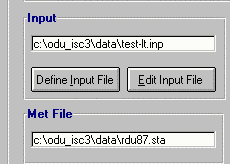
Input file portion in ODU_ISC3 Interface
You can tell ODU_ISC3 where is inpit datafile for the simulation by
clicking Define Input File button.
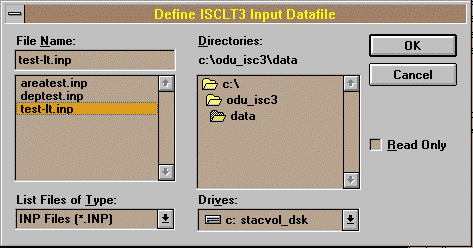
 A familiar File dialog box will appear. Chnage drive and directory as
necessary, and click on ISC3 input datafile you want to use for the
simulation. When you done, click OK button to confirm it.
A familiar File dialog box will appear. Chnage drive and directory as
necessary, and click on ISC3 input datafile you want to use for the
simulation. When you done, click OK button to confirm it.
 Don't worry. Meteorological datafile name defined inside of the Input datafile will
be scanned and automatically updated for your simulation.
You can change your input datafile selection any time by clicking
Define Input File
button from the ODU_ISC3 Interface.
Don't worry. Meteorological datafile name defined inside of the Input datafile will
be scanned and automatically updated for your simulation.
You can change your input datafile selection any time by clicking
Define Input File
button from the ODU_ISC3 Interface.
 TOC - ODU_ISC3 Usage

